8 benefits of a contact form widget for your website
A contact form in the corner of every page makes it easy to ask before buying. 8 benefits of a contact form widget, and what to look for when you choose one.
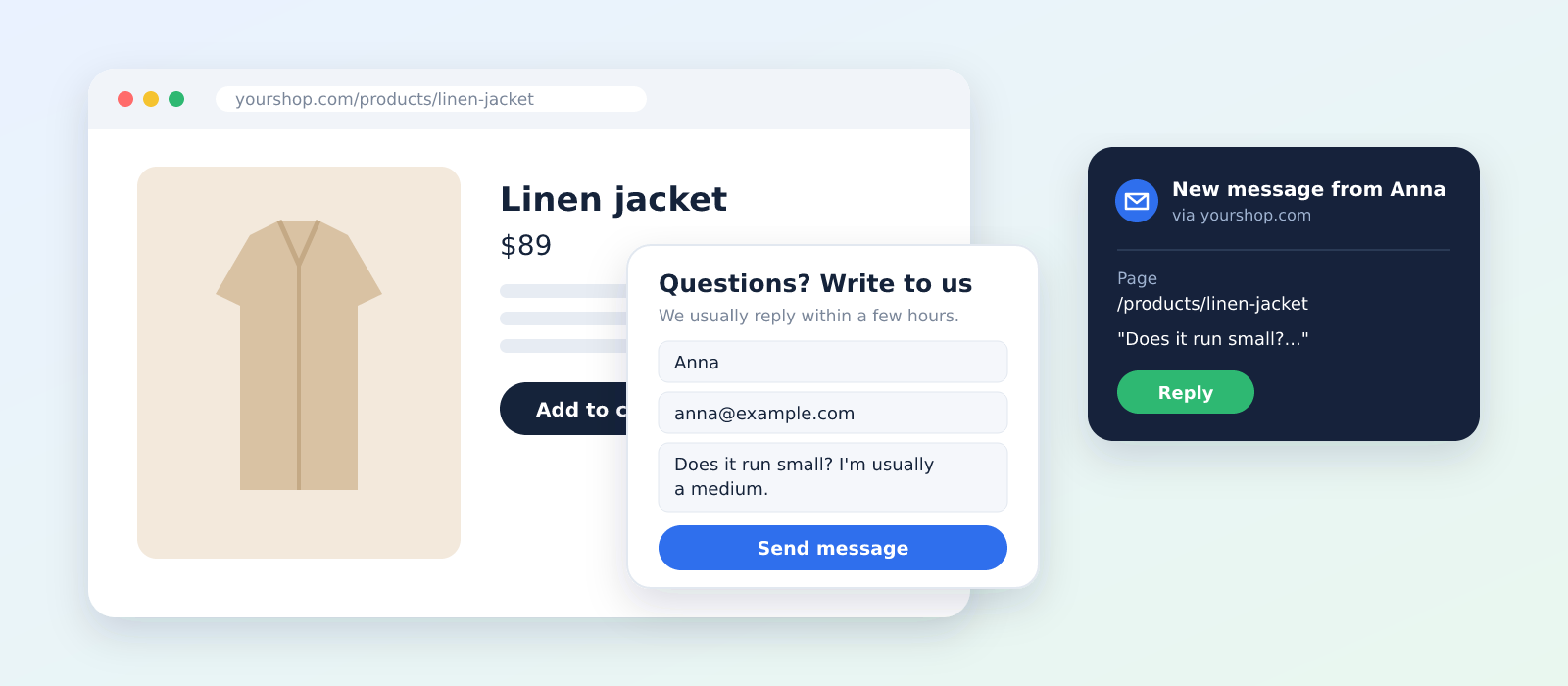
Most websites have a contact page. Few customers ever find it. They have a question about a size, a delivery date or whether a product fits, and instead of hunting through the footer for a contact link, they leave. A contact form widget fixes that by putting a small message box in the corner of every page, right where the question comes up. In this post, we go through 8 benefits of a contact form widget, how it compares with live chat and a contact page, and what to look for when you choose one.
What is a contact form widget?
A contact form widget is a small button that sits in a corner of your website, on every page. When a visitor clicks it, a short form opens: name, email and message. The message is sent to you by email, and the visitor carries on browsing. Unlike a contact page, it's always one click away. Unlike live chat, nobody has to be online to answer.
It's one of the simplest website widgets you can add, and one of the most useful.
8 benefits of a contact form widget
1. Questions get asked where they come up
A customer looking at a jacket wonders whether it runs small. If the only way to ask is a contact page three clicks away, many won't bother. With a widget, the question is one click away on the product page itself. The easier it is to ask, the more questions you get, and every answered question is a customer who's closer to buying.
2. Fewer lost sales
Many questions before a purchase are really doubts: "Will it arrive before Friday?", "Can I return it if it doesn't fit?", "Does this work with my model?". A visitor with an unanswered doubt rarely buys. A visitor who gets a quick, friendly answer often does, and remembers the shop that took the time to reply.
3. You know which page the question came from
"Is this available in blue?" is hard to answer if you don't know what "this" is. A good contact form widget tells you which page the visitor was on when they wrote. With the mojitiles Contact Form, the email shows the page, and your dashboard also shows the visitor's device, country and language. That makes it easier to answer right away, without asking follow-up questions.
4. Reply straight from your inbox
You don't need to learn a new tool or log in somewhere to answer. Messages arrive as normal emails, and when you press reply, your answer goes straight to the customer. You can also send messages to a different address than your login, such as a shared support inbox.
5. No message gets lost
Emails end up in spam folders. Inboxes get full. A good widget doesn't rely on email alone. Every message sent through the mojitiles Contact Form is also saved in your dashboard, so if an email ever goes missing, the message is still there.
6. Less spam than an email address on your site
An email address written on a website gets collected by bots and filled with spam. A contact form doesn't show your address at all. Spam bots are filtered out before their messages reach you, and the widget only works on your own domains, so nobody can copy it to another site.
7. It looks like part of your website
A contact form that looks like it came from somewhere else feels untrustworthy. Use your own brand colour and font, write your own heading, intro, button text and thank-you message, and choose the corner where it doesn't cover your content or buttons. Customers should feel like they're writing to you, not to a third party.
8. It takes minutes to set up
No developer, no plugin with a hundred settings. You add one line of code to your website, and the form appears on every page. There are step-by-step guides for Shopify, WooCommerce, Dandomain, Shoporama, Wix and plain HTML.
Contact form widget vs. live chat vs. contact page
| Contact page | Contact form widget | Live chat | |
|---|---|---|---|
| Visible on every page | No | Yes | Yes |
| Someone must be online | No | No | Yes, or it feels broken |
| Customer gets an answer | By email | By email | Right away, if you're there |
| Time to set up | A page to build | Minutes | Setup and staffing |
| Best for | Address, phone, company details | Small and medium shops | Shops with staff ready to chat |
Live chat is great when someone can answer within a minute. When nobody can, an empty chat window that says "We'll be back soon" does more harm than good. For most small webshops, a contact form widget gives customers the same easy way to ask, without promising an instant answer you can't always give. And you can still keep your contact page for your address and company details.
What to look for in a contact form widget
- Short form. Name, email and message. Every extra field means fewer messages.
- Page information. You should see which page the visitor wrote from.
- Reply by email. Answering should be as easy as replying to an email.
- Messages saved. A backup outside your inbox, so nothing gets lost.
- Spam protection that doesn't make customers solve puzzles.
- Your brand. Your colours, your font, your words.
- Works on mobile. Many questions are asked from a phone.
- Easy to install on your platform, without a developer.
5 tips for getting more out of your contact form
- Say when you'll reply. "We usually reply within a few hours on weekdays" in the intro sets expectations, and customers wait more patiently.
- Answer fast. A question before a purchase has a short life. An answer the same day is far more likely to turn into a sale than one three days later.
- Turn repeat questions into content. If three customers ask about delivery times, add them to the product page or an FAQ. During the holidays, show your last order date for Christmas delivery on every page. Our guide to Christmas shipping deadlines shows how.
- Write a warm thank-you message. "Thanks, Anna will get back to you today" feels more human than "Your message has been submitted."
- Look at where questions come from. If many messages come from one product page, that page is probably missing information.
Questions about contact form widgets
Is a contact form widget better than live chat?
It depends on whether someone can answer right away. If you can't staff a chat, a contact form widget is usually the better choice, because it never promises an instant answer, and customers still get an easy way to ask.
Do I still need a contact page?
It's still a good idea to have one for your address, phone number and company details. The widget makes it easy to ask a question from any page. The contact page is where customers look for facts about your business.
Does a contact form widget work on Shopify?
Yes. The mojitiles Contact Form works on Shopify, WooCommerce, Wix, Dandomain, Shoporama and any other website where you can add one line of code.
Add a contact form to your website
Make it easy for customers to ask, and you'll answer more doubts before they turn into lost sales. Create a free account, add your brand colour, and put the Contact Form on every page of your website in a few minutes. 💬